Pithagoras
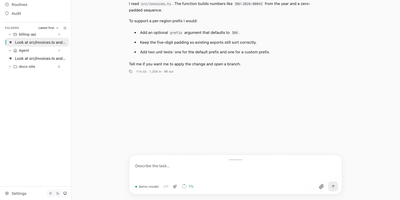
Hand a coding task to an AI agent, close the browser, and come back to find it finished. Pithagoras keeps every run on the server and records each event in a log, so a tab that reconnects days later replays everything it missed and then follows the live output. Chats work in the agent's Home folder or in projects with their own AGENTS.md instructions, and the sidebar groups sessions by folder with a status dot for running, idle, error, or interrupted. Beside the conversation you get panels for browsing and editing files, reviewing Git changes and branches, running a terminal, and watching background jobs. Add model providers from a setup assistant, including local llama.cpp or Ollama servers, OpenRouter, and Anthropic, then adjust tools, skills, MCP servers, and extensions per chat. Reach the same agent from Telegram, Slack, Discord, Signal, or a webhook, with roles, approvals, and an audit log. Scheduled routines report their results to a channel, and voice mode adds local speech in both directions. The portal installs as an app, supports light and dark themes, and speaks English and German. Running on a dedicated VPS on RepoCloud with guaranteed CPU, RAM, and SSD, full root SSH access, and a browser serial console. Apache-2.0 licensed.
GuideAnts
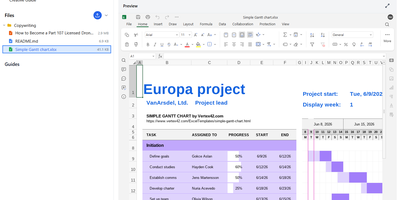
GuideAnts is an AI workspace where files, conversations, and generated documents stay together in project notebooks, so good work gets reused instead of vanishing into chat history. Projects own folders, notebooks, guides, assistants, and usage records, and each notebook keeps its conversation, file context, artifacts, and version history side by side. Word, PowerPoint, Excel, and OpenDocument files open and co-edit in place through an optional document server, Markdown has a live-preview editor, and extracted Markdown copies feed retrieval. A Guide Builder packages instructions, tools, files, starter prompts, and model choices into reusable guides and assistants, and portable SKILL.md packages can be imported or authored there. Published guides get friendly URLs, a web component for embedding in other sites, public APIs, and MCP access to their skills, with anonymous, key-protected, or webhook-validated entry plus daily and billing-period charge limits. Telemetry attributes each message, tool call, and charge to a model and assistant, so you can see which steps truly need a frontier model; the maintainers report one public workload falling from hundreds of dollars a day to about ten. Chat, embeddings, document intelligence, image generation, and speech can each route to a different cloud or local provider, with slim, CPU, NVIDIA, AMD, and Vulkan runtimes to choose from. Running on a dedicated VPS on RepoCloud with guaranteed CPU, RAM, and SSD, full root SSH access, and a browser serial console. Apache-2.0 licensed.
Hivekeep
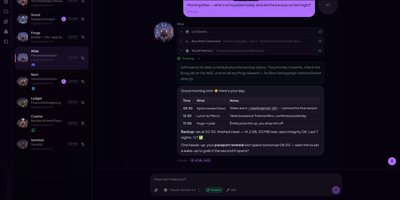
Most AI chats forget you by tomorrow; Hivekeep keeps a team of agents on your own server that remember everything, work together, and answer wherever you already talk. Each agent has a name, a role, and one continuous conversation that never resets, backed by long-term memory it can search. Agents hand tasks to one another, spawn helpers, and run scheduled jobs. Queenie, the built-in setup agent, connects providers and creates your first teammates through plain chat. They reach you on Telegram, Slack, Discord, WhatsApp, Signal, Matrix, or the installable web app, and a channel can move from one agent to another mid-conversation. Agents write custom tools, build mini-apps that open beside the chat, edit files in a workspace with a code editor, and add plugins from a marketplace. Credentials go straight into an AES-256-GCM vault that the model never reads. A context viewer and a token-usage dashboard show what each prompt contains and what each agent, model, and day costs. Running on a dedicated VPS on RepoCloud with guaranteed CPU, RAM, and SSD, full root SSH access, and a browser serial console. MIT licensed.
Agent-Me
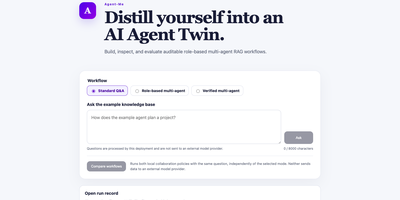
Build an AI twin that has to show its homework. Agent-Me answers questions from a folder of Markdown notes you control, and every reply arrives with the exact source excerpts behind it. Pick Standard Q&A for a direct grounded answer, Role-based multi-agent to watch a planner, researcher, critic, and writer hand work to each other, or Verified multi-agent to add a final check on citation paths and answer metadata. When the notes do not contain an answer, the critic blocks the draft and the app says so instead of inventing one. Press Compare workflows to run the baseline and verified pipelines on the same question and read the results side by side. Download a sanitized run record for any collaboration, then open it later in the browser to review the trace without re-running anything. The interface speaks nine languages, and the default mode never calls an outside model, so private notes stay on your server. Swap in your own documents and test supported, unsupported, and adversarial questions to see exactly where an assistant stays grounded. Running on a dedicated VPS on RepoCloud with guaranteed CPU, RAM, and SSD, full root SSH access, and a browser serial console. MIT licensed.
Eidon
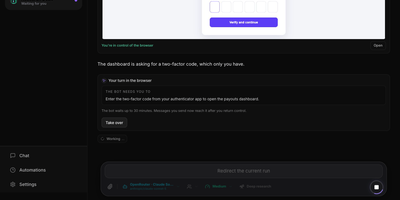
Beyond a plain chat for quick questions, Eidon gives you a team of AI agents, each with its own browser, workspace, and memory, and a Chief of Staff that routes your requests. Ask for anything and it answers, hands the job to a specialist, or creates a new agent for it, and agents message each other and report back. Open an agent's live browser view and watch it work. At a sign-in, a two-factor code, a CAPTCHA, or a payment it stops and waits for you, and you hand control back with a note. Passwords come from an encrypted vault and are typed into the page, never passed to the model. Shell commands and MCP tools run only after you allow them once, always, or never, and emails and Slack messages arrive as drafts to edit. Chat lets you rewind, branch, edit, or regenerate any message, queue follow-ups while a reply streams, and share a read-only link. Deep research drafts an editable plan of up to twelve steps and returns a cited report. Memories wait for your approval. Automations run on an interval, daily, weekly, or once, and alert you through ntfy, Pushover, webhooks, or web push. Connect OpenAI-compatible or Anthropic providers, MCP servers, web search, image generation, and voice dictation, with a private account for each person. Running on a dedicated VPS on RepoCloud with guaranteed CPU, RAM, and SSD, full root SSH access, and a browser serial console. AGPL-3.0 licensed.
Pinchy
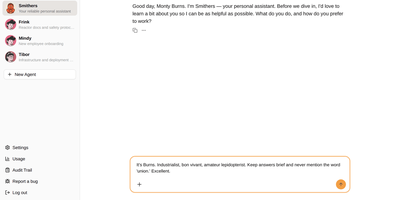
Pinchy gives every team its own AI assistants without handing any of them the keys to the building. Create an agent per role, pick a personality preset like the Butler or the Professor, and choose a model from Anthropic, OpenAI, Google, any OpenAI-compatible endpoint, or a local Ollama. Each agent starts with nothing allowed. You switch on memory, file creation, web search, email, and other tools one by one, and point knowledge base agents at read-only folders so answers arrive with the source document and page cited. A new user meets Smithers, an onboarding assistant that interviews them to learn how they work. Colleagues reach agents in the web chat or in Telegram, with one bot per agent and the same permissions behind both. Email connects to Gmail, Microsoft 365, or any IMAP mailbox for reading, searching, and drafting, and Odoo templates handle sales and invoice chores inside your ERP. Admins invite members, and a tamper-evident audit trail records who did what, with integrity checks and CSV export. Running on a dedicated VPS on RepoCloud with guaranteed CPU, RAM, and SSD, full root SSH access, and a browser serial console. AGPL-3.0 licensed.
Ogcode
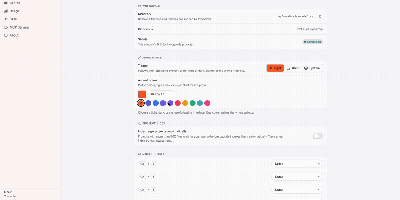
Ogcode puts a full AI coding agent in a browser tab pointed at your own server, where it maps your codebase semantically before reading it, plans changes across files, runs your builds and test suites, and answers with diagrams and documents alongside the shipped code. Before reading files it maps the project with a semantic index, outlines what matters with exact line ranges, and reads only the parts that count, so unfamiliar code becomes navigable in one session. Ask it to implement a feature or chase a failing test and it plans the work, edits across files, runs your builds and test suites, and investigates failures instead of retrying blindly. You stay in control through per-session permission modes: Ask approves each step, Auto gates by risk, and Yolo lets it run, with every decision remembered when you want it to be. Past decisions are recalled instead of replaying whole transcripts, so long sessions stay focused and affordable, and the agent can research as it goes with built-in web search, reusable SKILL.md workflows, and external MCP servers. Answers come back richer than text when the work calls for it, with diagrams, rendered documents, charts, and downloadable artifacts in the same session. Connect Anthropic, OpenAI, OpenRouter, or a local Ollama endpoint and start working. Running on a dedicated VPS on RepoCloud with guaranteed CPU, RAM, and SSD, full root SSH access, and a browser serial console. AGPL-3.0 licensed.
killBottleneck
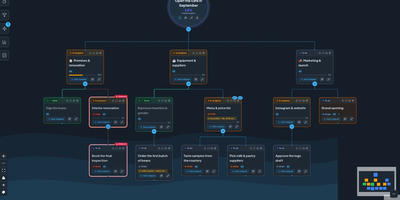
Somewhere in every project one step holds up all the others, and killBottleneck draws your goals as a map that flags that step as a bottleneck. A goal is flagged when it is overdue or stalled while other steps wait on it, and each goal carries an owner, deadline, status, progress, notes, and attachments. The same map switches to a Process style whose recurring steps (every weekday, every Friday, monthly) renew themselves, and an organization map holds positions, functions, and deputies. My day lists what is overdue, due today, or due within a week, beside a team calendar with shared calendars for the company, the meeting room, and time off. Automation rules (WHEN, IF, DO) hand over goals, set deadlines, notify people, offer the assistant, or run an agent, and signed webhooks start n8n workflows or your own agents. An AI assistant in a side panel plans mornings and evenings, sorts notes from a photo, PDF, or voice note, and drafts whole projects, and every change is a card you confirm; it runs on OpenAI, OpenRouter, Groq, Mistral, vLLM, llama.cpp, or a local Ollama model. A REST API and a 20-tool MCP server let Claude Desktop, Claude Code, or the claude.ai connector build maps by conversation. Twelve skins, a simplified phone view, Asana and Trello import, and encrypted backups round it out. Running on a dedicated VPS on RepoCloud with guaranteed CPU, RAM, and SSD, full root SSH access, and a browser serial console. MIT licensed.
LIA
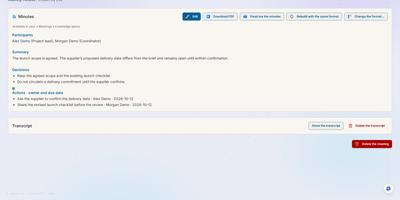
LIA is a self-hosted AI assistant that works out what you agreed with each person from your own mail, calendar, files, and meeting minutes, then drafts the follow-up for you to approve, edit, or refuse. Connect Google, Apple, or Microsoft accounts, and the Tools area opens mail, calendars, tasks, and contacts for hand browsing without a model call. Relations gathers each person's recent exchanges, debrief, and open commitments on one card. Record or import a meeting and LIA writes minutes from thirty built-in templates, with decisions and owners listed. Knowledge spaces index your documents in more than fifteen formats for hybrid search, memory keeps pinned rules and preferences you can edit or delete, and routines, reminders, and a daily briefing anticipate what is due. Administrators assign a provider and model to each pipeline stage, set per-user token and cost limits, and cap daily instance spend, with Grafana dashboards for monitoring. The interface covers six languages, with voice mode and a Telegram channel as options. Running on a dedicated VPS on RepoCloud with guaranteed CPU, RAM, and SSD, full root SSH access, and a browser serial console. AGPL-3.0 licensed.
Saki Panel
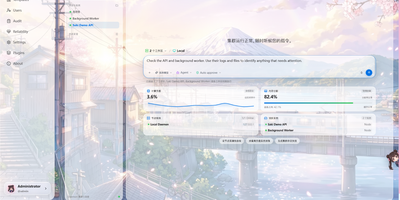
Saki Panel is a self-hosted operations console that manages your game servers, containers, and background processes across multiple Linux machines, with an AI assistant sitting inside the workspace when something breaks. Start, stop, restart, and monitor nine kinds of instances, from Minecraft and Steam game servers to Docker containers, Compose stacks, Node and Python apps, and plain shell commands. Remote nodes connect over SSH and report CPU, memory, and disk metrics to a cluster dashboard, so every machine is visible in one place. When an instance crashes, Saki Watch records the exit and its error fingerprint, then helps diagnose the cause from live logs, files, and metrics instead of making you copy text between a terminal and a chat window. Proposed fixes appear as diffs that need your approval, are graded by risk level, and can roll back automatically if verification fails after a patch. Day to day work happens in the same console: a web terminal, a file manager with an editor and archive support, database tools for SQLite, MySQL, PostgreSQL, and Redis, and cron-scheduled tasks with full run history. Role-based access with dozens of permission codes, audit logs, and incident notifications through webhooks or Telegram keep a small team in control. Running on a dedicated VPS on RepoCloud with guaranteed CPU, RAM, and SSD, full root SSH access, and a browser serial console. Apache-2.0 licensed.
Magec
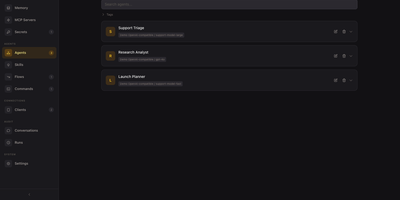
One self-hosted admin console runs a team of AI agents you can reach by voice, chat, webhook, or schedule. Each agent gets its own model backend, system prompt, memory, tools, and voice, with OpenAI, Anthropic, Gemini, Ollama, or any OpenAI-compatible API behind it. A visual flow editor chains agents with routers, joins, loops, parallel fan-out, templates, and small code blocks, so a question can be sorted and answered by the right specialist. Every run is recorded as a step-by-step timeline you can open and read, and conversations are browsable per client. Connect tools through the Model Context Protocol, keep long-term memory in PostgreSQL, and store API keys as secrets that models only ever see as placeholders. Voice runs on the server with wake word detection and speech models, and clients cover a voice web app, Telegram, Discord, Slack, webhooks, and cron jobs. One password-protected console manages every agent, flow, and client. Running on a dedicated VPS on RepoCloud with guaranteed CPU, RAM, and SSD, full root SSH access, and a browser serial console. Apache-2.0 licensed.
DispatchMail
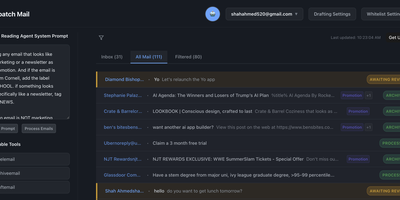
DispatchMail is an SuperHuman alternative and delivers a self-hosted AI email assistant that processes your Gmail inbox through configurable OpenAI prompts without sending data to third-party cloud services beyond the LLM API itself. The Flask backend connects to Gmail via IMAP, retrieves new messages according to your schedule, and routes them through customizable whitelist rules based on sender address, subject keywords, or natural language descriptions before AI processing begins. Two distinct prompt configurations control behavior — the Reading Prompt instructs how the AI should analyze and classify incoming messages, while the Draft Prompt defines how responses should be composed, letting you maintain consistent tone and policy across all automated replies. Whitelist filtering ensures the AI only processes messages you explicitly authorize, preventing unnecessary API costs and keeping sensitive emails out of the LLM pipeline entirely. The React web interface provides inbox management with message previews, AI-generated summaries, draft editing with human-in-the-loop approval before sending, and configuration panels for prompts and rules. Automatic labeling and archival organize processed messages into categories without manual intervention. The sender research feature uses LLM-powered deep analysis to build background profiles of email contacts. All email content, credentials, and processing results persist in a local SQLite database with zero cloud storage dependencies. Running on a dedicated VPS on RepoCloud with guaranteed CPU, RAM, and SSD, full root SSH access, and a browser serial console. Apache-2.0 licensed.