Browser Use WebUI
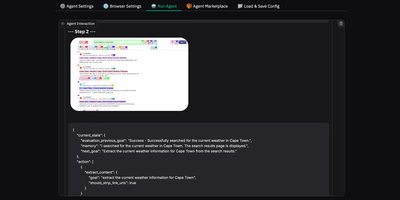
Browser Use Web UI lets you describe a web task in plain English and watch as an AI agent autonomously navigates pages, clicks buttons, fills forms, and extracts information without writing any automation code. Backed by over 16,000 GitHub stars, the Gradio-based interface supports 14+ LLM providers through a unified abstraction layer: OpenAI GPT, Anthropic Claude, Google Gemini, Azure OpenAI, DeepSeek, and local Ollama models are all configurable via dropdown menus without touching code or environment files. The BrowserUseAgent handles interactive single-task automation with step-by-step LLM decision-making and vision-based page understanding, while the DeepResearchAgent orchestrates multi-step research workflows using Langgraph state machines that spawn parallel browser instances with asyncio concurrency control. Custom browser support connects your existing Chrome profile to preserve logins, cookies, and sessions across agent runs, eliminating re-authentication overhead. Persistent browser sessions maintain complete interaction history between tasks for debugging and demonstration. The Docker deployment bundles Chrome, Playwright, and a VNC server in a single container, exposing the Gradio interface on port 7788 and a noVNC viewer on port 6080 for real-time observation of agent behavior. MCP integration via MultiServerMCPClient enables external tool access. Screen recording captures agent workflows as video for review and documentation. Running on a dedicated VPS on RepoCloud with guaranteed CPU, RAM, and SSD, full root SSH access, and a browser serial console. MIT licensed.
Deploy