Sora Frame
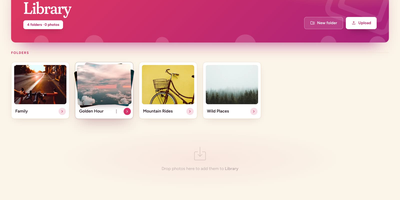
An old tablet on the shelf can show family photos all day once Sora Frame feeds it. The slideshow runs in any browser with soft cross-fades, a large clock, date, and weather widget, and it keeps the screen awake, even on iPads and phones. Install it to the home screen like an app, then pick what plays: every photo or a single folder, nested folders included. The library takes photos by drag and drop or the Upload button, builds folder covers from their own pictures, moves photos with a drag, deletes a multi-selection in one go, and offers an optional Google Photos import. JPEG, PNG, WebP, GIF, and iPhone HEIC files are accepted, and only a resized copy is stored. Notes slip a message like a visit reminder into the rotation, with up to four photos, a date range, an optional event countdown, and a choice of eight memory-book layouts. Each frame or family member gets a PIN limited to chosen folders, and a new frame pairs by scanning a QR code or opening an address that carries the PIN. The interface speaks English, Spanish, French, German, Portuguese, Italian, Dutch, Hindi, Japanese, Chinese, and Arabic, and keyboard shortcuts cover play, next, fullscreen, and photo info. A living room shelf, a grandparent's tablet, or an office desk display makes a fine home for it. Running on a dedicated VPS on RepoCloud with guaranteed CPU, RAM, and SSD, full root SSH access, and a browser serial console. AGPL-3.0 licensed.
Genealogy
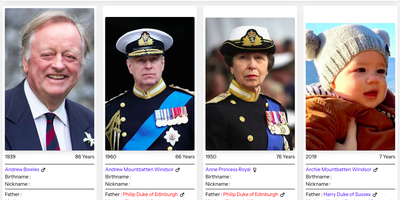
Genealogy turns scattered family records into a living, browsable family tree that relatives can explore together and keep growing. Each person gets a full profile with parents, partners, children, and siblings, and couples are first-class records too, so remarriages, separations, and blended families are represented honestly instead of being forced into a single marriage box. Photos can be uploaded in batches, watermarked, and browsed in a carousel on the profile, while documents attach the scans and certificates that back up each fact. Events build a timeline overview for every person, so births, marriages, moves, and milestones read as a story rather than a spreadsheet. Several branches can live side by side: separate trees are organized as teams with owners, managers, editors, and read-only members, ownership can be transferred, and invitations keep research private to the family. Personal settings follow each user, including language, timezone, and a light or dark theme on any screen size. A built-in backup manager runs manual or scheduled daily backups with cleanup and email confirmation, and a log viewer surfaces slow queries and errors before they surprise you. Running on a dedicated VPS on RepoCloud with guaranteed CPU, RAM, and SSD, full root SSH access, and a browser serial console. MIT licensed.
dinkydash
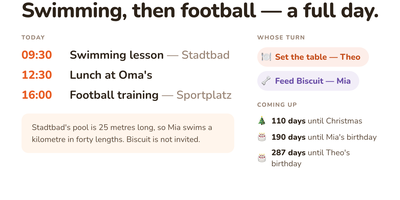
The family calendar nobody opens helps nobody, so DinkyDash puts it on a screen the household walks past. Paste in iCal links from Google, iCloud and Outlook calendars and the board merges them into one agenda in time order, big enough to read from across the kitchen, with tomorrow tucked underneath when the day leaves room. A personal calendar can share only the events marked for a partner and keep work and private appointments to itself. Chores answer the daily argument on their own: whose turn it is moves on with the date, so nobody ticks anything off. Birthdays, holidays and special dates count down in the corner, and once a day the board gets a fresh headline written about your actual day, with a useful note parked under the agenda. Light and dark themes come from the settings page, and that same settings page on your phone edits the configuration file directly, comments preserved. A preview page shows the board at Pi, TV and tablet sizes side by side before you mount anything. There is deliberately no login: it assumes your home network, rewards you with a board you never sign into, and asks to stay behind a VPN or an authenticated proxy if you view it away from home. Running on a dedicated VPS on RepoCloud with guaranteed CPU, RAM, and SSD, full root SSH access, and a browser serial console. MIT licensed.
Hammond
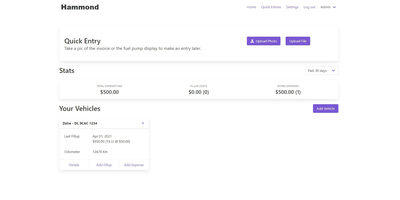
When Clarkson, the once-popular fuel logger, stopped receiving updates, Hammond stepped in as its logical successor - a self-hosted vehicle expense tracker. Written in Go with a Vue.js interface and SQLite storage - a single lightweight container, no external database - it tracks every cost your vehicles generate: fuel fill-ups with cost, volume, and odometer readings; maintenance and repairs; and arbitrary other expenses, each attachable with photos and documents stored against the vehicle. The multi-user, multi-vehicle design is what sets it apart from phone apps: a household or small business adds all its vehicles and all its drivers, shares vehicles across users, and every fill-up lands in one ledger no matter who was driving. The Quick Entries feature respects how expenses actually happen - snap a photo of the receipt or pump screen at the gas station, then complete the structured entry later when you have a minute. Reporting works at both the vehicle level (cost per distance, fuel economy trends) and across the whole fleet. Migration matters here: importers for Clarkson, Fuelly, and Drivvo bring years of fill-up history along, so switching does not mean starting your data over.