DocuSeal
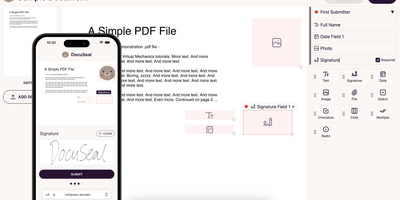
Contracts signed on your own server: DocuSeal is the most feature-complete open-source, self-hosted alternative to DocuSign. A WYSIWYG builder turns any PDF into a fillable form with 14 field types: signature, initials, date, file upload, checkbox, dropdown, radio, stamp, and more. Documents route to multiple submitters in sequence or parallel, with automated SMTP email notifications, reminders, and a mobile-optimized signing experience that works on any device without an account. Every completed document carries an automatic PDF eSignature with verification and an audit trail. Templates are reusable and can also be generated programmatically - from HTML via API or from PDFs and DOCX files with embedded field tags - and the REST API plus webhooks drive full workflow automation, with embedded signing forms and form builders for React, Vue, Angular, and plain JavaScript. Files store on disk or in S3, Google Cloud Storage, or Azure. The UI ships in 7 languages with signing in 14. Runs on SQLite, PostgreSQL, or MySQL; AGPL-3.0 licensed with unlimited documents and no per-signature fees.
AppFlowy
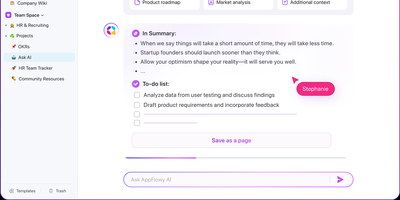
With over 75,000 GitHub stars and native apps across macOS, Windows, Linux, iOS, and Android, AppFlowy is the most widely adopted open-source alternative to Notion — delivering the same block-based workspace model with full data sovereignty. The Flutter frontend renders natively on every platform while a Rust backend powered by Actix-web and Tokio handles CRDT-based real-time collaboration, ensuring sub-second sync across devices with conflict-free concurrent editing. Relational databases support grid, board, kanban, calendar, and gallery views over the same dataset, with two-way relations, rollups, advanced filters, sorts, and formula calculations that cover the majority of Notion's database workflows. The block editor supports 40+ content types including nested pages, toggles, callouts, code blocks with syntax highlighting, embeds, and slash-command insertion. AI integration connects to OpenAI, Anthropic, or local models via Ollama for writing assistance, summarization, and translation — all without sending data off-premises when using on-prem LLMs. Team spaces with workspace-level and per-page permissions, OAuth and SSO authentication through GoTrue, and S3-compatible object storage via MinIO provide enterprise-grade access control and file management. The self-hosted stack deploys through Docker Compose with PostgreSQL for metadata, Redis for caching and pub/sub, and a dedicated background worker for imports and email notifications. Offline-first architecture ensures the desktop app functions without connectivity, syncing changes when the connection resumes. Running on a dedicated VPS on RepoCloud with guaranteed CPU, RAM, and SSD, full root SSH access, and a browser serial console. AGPL-3.0 licensed.
Etherpad
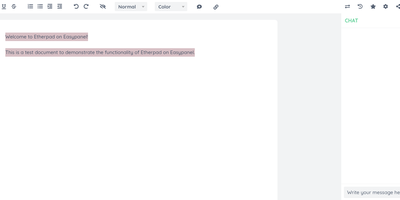
In continuous open-source development since 2009, Etherpad is the original really-real-time collaborative editor - used by Wikimedia, governments, EU public-sector institutions, and tens of thousands of self-hosters. Its core idea is visible authorship: every keystroke is attributed with author colors, every revision preserved, and the timeslider lets you scrub through a document's entire history character by character. Multiple people type into the same pad and see each other's changes instantly - it scales to thousands of simultaneous editors per pad. The base install is deliberately lightweight; capability comes from roughly 290 plugins installable from the admin web UI: comments, images, tables, drawing, video chat via WebRTC, math rendering, code highlighting, and authentication via OAuth, LDAP, or OpenID. AI is pointedly a plugin, not a default - you choose the model and infrastructure, or never turn it on. There is no telemetry. For integrators, an HTTP API (with OpenAPI definitions at /api/openapi.json) manages pads, users, and groups for embedding in your own applications, and the ueberDB abstraction layer supports PostgreSQL, MySQL, Redis, MongoDB, and SQLite backends. Full data export is built in, the format is open, it is translated into 105 languages, and it runs on anything from a Raspberry Pi to a server farm. Apache 2.0 licensed, Node.js based.
Collabora Office
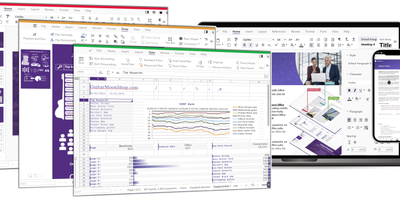
Real LibreOffice document engineering in the browser: Collabora Online is built by the company employing much of the former SUSE LibreOffice team - not a reimplementation. This deployment runs CODE (Collabora Online Development Edition), the collabora/code server that renders and edits documents entirely server-side while browsers get high-fidelity WYSIWYG output, so layout and formatting survive round-trips that break lesser converters. Four editors ship in one container: Writer for text documents (comments, track changes with comparison and restoration, form handling), Calc for spreadsheets (advanced formulas, macros, pivot tables, per-user sheet views, server-enforced cell protection), Impress for presentations, and Draw for Visio-class diagrams. Format compatibility spans DOCX, XLSX, PPTX, the ODF family, PDF, and dozens more - including Visio and Publisher import. Real-time collaborative editing supports multiple simultaneous editors with visible cursors and commenting. The architectural point: documents are processed on your server and never leave it, which is why Collabora is the engine behind Nextcloud Office and integrates with ownCloud, Seafile, and any WOPI-speaking host - or embeds in your own application via the SDK. An admin console monitors sessions and memory. For organizations that need Google Docs-style collaboration with actual data sovereignty, this is the reference open-source answer.
Carbone
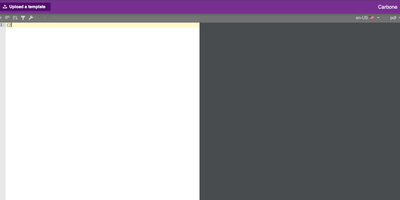
Document-generation code is the worst kind of code in your backlog - Carbone kills it. Its insight is separating design from data - templates are ordinary office documents (DOCX, ODT, XLSX, PPTX, HTML, even custom XML) built in LibreOffice, Microsoft Office, or Google Docs, with mustache-like markers such as {d.companyName} typed directly into the text. Send a template plus JSON from your existing APIs to the HTTP API, and Carbone returns the finished document - exported as-is or converted to PDF, XLSX, CSV, HTML, PNG, EPUB, and more via its integrated LibreOffice converter (Chromium and OnlyOffice engines are also supported for HTML-fidelity and office-format conversions). The template language goes well beyond substitution: loops over arrays render dynamic table rows, filters and aggregations run inside the document, and built-in formatters handle dates, numbers, currencies, timezones, and locales, with custom JavaScript formatters when needed. One template serves multiple languages through translation markers with auto-maintained translation files. The XML-agnostic engine means anything your document editor can design - pagination, headers, footers, nested tables, charts - survives generation intact, and Carbone guarantees no breaking changes in template syntax. Node.js-based, fast via multi-threaded LibreOffice conversion. The invoices, contracts, and reports your product owes its users become template edits, not sprints.
Colanode
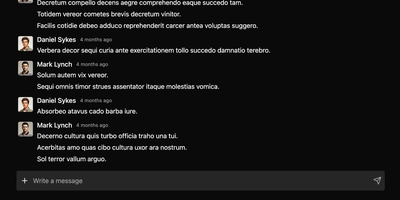
With nearly 5,000 GitHub stars and a Hacker News launch that garnered 147 points, Colanode delivers the first genuinely local-first alternative to both Slack and Notion in a single self-hosted workspace — writing every operation to a client-side SQLite database before syncing to your server, so teams work at full speed offline, on planes, or through intermittent connections without ever losing a draft. The real-time chat system provides channels and direct messages with instant delivery via WebSocket, while the rich text editor offers Notion-style block-based pages for documents, wikis, meeting notes, and knowledge bases with headings, code blocks, embeds, and nested hierarchies. Customizable databases organize structured data with custom fields and three dynamic views — table for spreadsheet-style browsing, kanban for visual workflow boards, and calendar for time-based planning. Conflict-free Replicated Data Types powered by Yjs handle concurrent editing across pages and database records: multiple users modify the same document simultaneously and the system merges changes automatically without manual conflict resolution. File management supports upload, sharing, and organization within workspaces using pluggable storage backends including local filesystem, S3-compatible services, Google Cloud Storage, and Azure Blob Storage with TUS resumable uploads for large files. The server runs Fastify with Zod validation on Node.js 20+, persists to PostgreSQL with pgvector extension, uses Redis for event broadcasting, and deploys via a single Docker image. Running on a dedicated VPS on RepoCloud with guaranteed CPU, RAM, and SSD, full root SSH access, and a browser serial console. Apache-2.0 licensed.
Papermerge
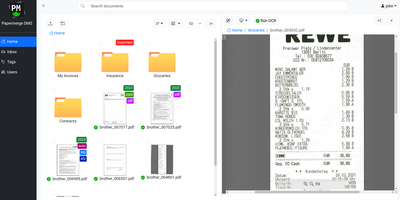
Receipts, contracts, and letters that arrive as pixels rather than text: Papermerge is a document management system built specifically for scanned documents. Upload a PDF, TIFF, JPEG, or PNG and OCR runs automatically, with a real-time status indicator beside the document title; under the hood it drives OCRmyPDF and Tesseract, supporting 130+ languages and producing a new document version with a selectable, searchable text layer you can download. Full-text search runs across everything, with multiple search-engine backends (Xapian by default). The interface deliberately mimics a modern desktop file browser: dual-panel commander, drag and drop, hierarchical folders, and colored tags on documents and folders. Page management fixes what scanners get wrong - delete blank pages, rotate, reorder, merge, extract, and move strayed pages between documents, powered by PikePDF. Document types act as categories, each with its own custom metadata fields, so invoices carry vendor and amount while contracts carry parties and dates. Versioning preserves every state of a document. Multi-user support includes groups, group ownership, permission management, and document/folder sharing between users and groups, and an OpenAPI-compliant REST API automates ingestion from scanners or scripts. Apache-licensed, ideal for long-term digital archives.