Google Webfonts Helper
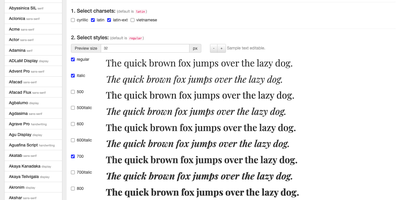
Self-hosting a Google font takes four steps in Google Webfonts Helper: pick a family, choose charsets and styles, copy the @font-face CSS, and download the files. The family list can be filtered by typing part of a name or category and ordered by family, category, popularity, last modified date, number of styles, or number of charsets. Each family page shows its styles and charsets beside an editable live preview with adjustable size, and ticking charsets and styles decides which files are generated. CSS comes in three modes: Modern Browsers with WOFF2 only, Legacy Support adding TrueType, and Historic Support adding EOT, WOFF, and SVG. A folder prefix field rewrites every url() to match where the files will live, and each rule sets font-display: swap. A zip download bundles the files in the selected mode's formats, named after the family, version, and charsets. A public JSON API lists families, returns font file URLs, and serves zips filtered by subsets, variants, and formats. Serving the files from your own domain keeps font requests off Google's servers, which helps sites with strict privacy requirements. To run the helper yourself, start one Docker container with a Google Fonts API key and publish port 8080; the image runs rootless. Running on a dedicated VPS on RepoCloud with guaranteed CPU, RAM, and SSD, full root SSH access, and a browser serial console. MIT licensed.
Deploy