MindRoom
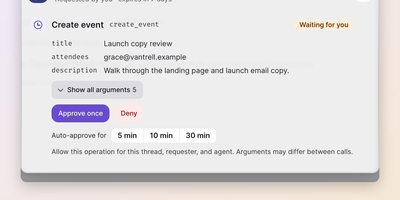
Your team's group chat could have a colleague who has read every email, ticket, and document, remembers all of it, and answers in seconds; MindRoom puts AI agents like that into your chat rooms as full participants. Each agent is a real user on the open Matrix protocol, so you talk to it in MindRoom Chat on web or mobile, in any other Matrix client, or through bridges in Slack, Telegram, WhatsApp, and Discord. Give every agent its own model: a local model for private rooms, a frontier model for hard coding problems, and switch per room or thread whenever the work changes. Agents connect to more than 100 tools, including Gmail, calendars, GitHub, Google Drive, Home Assistant, and any MCP server, and they search your own documents and knowledge bases for answers with sources. Memory persists across conversations and platforms, so an agent remembers people, preferences, and project context months later and can turn repeated work into reusable skills. Before an agent sends an email or runs a command, an approval card shows exactly what will happen; you tap once to allow it, and sandboxed workers keep executed code away from your credentials. Schedule morning briefings, silent inbox checks, and recurring digests in plain language, or wake an agent from any other system with a single HTTP request. Running on a dedicated VPS on RepoCloud with guaranteed CPU, RAM, and SSD, full root SSH access, and a browser serial console. Apache-2.0 licensed.
Live Helper Chat
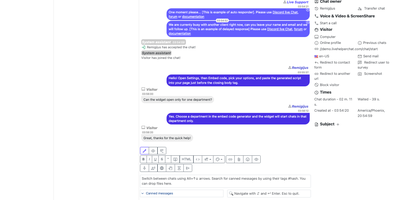
Add a live support desk to any website with Live Helper Chat, where visitors talk to operators or bots and you own every transcript. Site owners paste a generated embed snippet into any page, and the start-chat fields are customizable. Chats are routed by department, language, location, or custom attributes, wait in a priority queue, and move between agents. Operators, departments, and simultaneous chats are unlimited. Agents watch a visitor type before the message is sent, read pages visited and time on site in the online visitors list, and send proactive invitations to people who linger. Voice, video, and screen sharing run through Jitsi or Agora, and a screenshot shows what the visitor sees. Bot designers chain triggers and actions in a visual builder, call ChatGPT, Gemini, Ollama, Rasa, or any REST API, and hand the conversation to a person when needed. Incoming email becomes tickets beside chats, and extensions connect Telegram, WhatsApp, Facebook Messenger, and Twilio SMS. Staff answer from the browser, a desktop app, a Chrome extension, or iOS and Android apps. Management tools include roles, groups, statistics, transcripts, and an archive, and extensions add two-factor login, LDAP, and single sign-on. It suits banks, healthcare teams, universities, and game studios that must keep chat data in house. Running on a dedicated VPS on RepoCloud with guaranteed CPU, RAM, and SSD, full root SSH access, and a browser serial console. Apache-2.0 licensed.
PiClaw
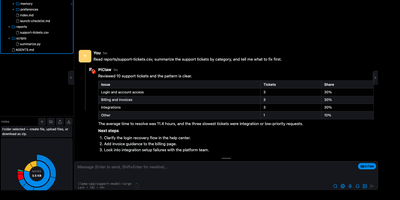
Chat, files, editor, and shell share one browser window, so nothing the agent does happens out of sight. PiClaw streams replies from the model provider you configure, hosted or a local OpenAI-compatible server, and you can steer a running turn, queue follow-ups, or branch a side question with /btw. The workspace sidebar shows a file tree with folder sizes. Open a Markdown note for a live preview with checklists and tables, a CSV for a table view, or a script in the code editor with syntax highlighting and an optional Vim mode. A detachable terminal runs shell commands in the same workspace, and the agent's own file and shell tools work there too. Scheduled tasks run on cron timings, chat history stays searchable between visits, and nightly Dream memory consolidates notes into plain files. Settings pages cover providers, models, MCP servers, keychain secrets, budgets, and session recordings. Optional add-ons bring Draw.io, kanban boards, and Proxmox or Portainer tools. Browser sign-in supports authenticator codes and passkeys, and the layout adapts to phones. A homelab server, a laptop, and a phone can all open the same private agent workspace, which suits solo developers and small teams. Running on a dedicated VPS on RepoCloud with guaranteed CPU, RAM, and SSD, full root SSH access, and a browser serial console. MIT licensed.
Colanode
With nearly 5,000 GitHub stars and a Hacker News launch that garnered 147 points, Colanode delivers the first genuinely local-first alternative to both Slack and Notion in a single self-hosted workspace — writing every operation to a client-side SQLite database before syncing to your server, so teams work at full speed offline, on planes, or through intermittent connections without ever losing a draft. The real-time chat system provides channels and direct messages with instant delivery via WebSocket, while the rich text editor offers Notion-style block-based pages for documents, wikis, meeting notes, and knowledge bases with headings, code blocks, embeds, and nested hierarchies. Customizable databases organize structured data with custom fields and three dynamic views — table for spreadsheet-style browsing, kanban for visual workflow boards, and calendar for time-based planning. Conflict-free Replicated Data Types powered by Yjs handle concurrent editing across pages and database records: multiple users modify the same document simultaneously and the system merges changes automatically without manual conflict resolution. File management supports upload, sharing, and organization within workspaces using pluggable storage backends including local filesystem, S3-compatible services, Google Cloud Storage, and Azure Blob Storage with TUS resumable uploads for large files. The server runs Fastify with Zod validation on Node.js 20+, persists to PostgreSQL with pgvector extension, uses Redis for event broadcasting, and deploys via a single Docker image. Running on a dedicated VPS on RepoCloud with guaranteed CPU, RAM, and SSD, full root SSH access, and a browser serial console. Apache-2.0 licensed.
Nakama
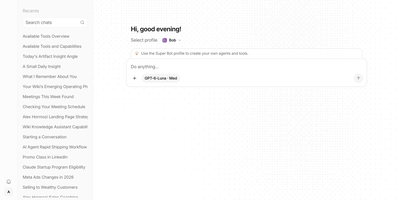
Nakama gives your whole team a shared home for AI agents, where each agent has its own identity, memory, tools, and permissions and meets people where they already talk. The dashboard feels like a familiar chat app: pick an agent from the rail, start a conversation, and watch it use tools, recall memory, and reply inside Telegram, WhatsApp, Discord, or Slack when the work lives there. Every agent is configured as a small personality you can read and edit, with prompt files for its soul, style, instructions, and memory, plus tabs for its channels, tools, MCP servers, and skills. One server hosts many organizations with invites and roles, and agents stay isolated from each other so the support agent never wanders into the finance agent's toolbox. The control center manages workspace settings, model providers, plugins, and integrations, and a connector layer opens the door to more than a thousand external apps. Daily encrypted backups and an in-app update button keep operations boring, and the entire platform idles in about two hundred megabytes inside a single container. Running on a dedicated VPS on RepoCloud with guaranteed CPU, RAM, and SSD, full root SSH access, and a browser serial console. MIT licensed.
CowAgent
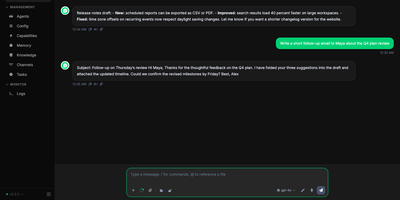
CowAgent is a personal AI agent that plans a task, picks the right tool, and keeps working until the job is done, all from a browser console on your own server. Open the chat page to hand it a request, and watch it read files, run terminal commands, search the web, and report back. Build a team of agents, each with its own role, model, skills, and knowledge, then have them collaborate in one shared conversation. Memory is layered into context, daily notes, and core facts, so the agent gets to know you over time, and a knowledge base organizes saved articles and documents into a browsable wiki. Install skills from a hub, from GitHub, or by describing one in plain language, and connect MCP tools through a form or pasted JSON. Provider credentials for chat, vision, image generation, speech, and embeddings live in one Models page, so each capability can use a different vendor. Connect Telegram, Slack, Discord, WeChat, Feishu, DingTalk, or WeCom and schedule recurring tasks. An OpenAI-compatible Chat API and shareable guest pages put the agent in front of other people. Running on a dedicated VPS on RepoCloud with guaranteed CPU, RAM, and SSD, full root SSH access, and a browser serial console. MIT licensed.
Nautilo
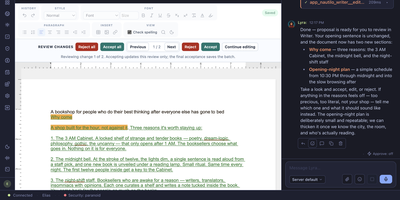
Most AI tools give one person one chat window; Nautilo is built for the room where your whole team, and each person's own AI Genie, work on the same thing at the same time. Give your Genie a personality, memory, face, and voice, then bring colleagues and their Genies into a shared Room to pull an idea apart, draft it, and send an agent off to research the missing piece. Six bundled creative apps cover the work itself: Writer for documents, Sheets for spreadsheets, Slides for decks, Board for planning, Design for visuals, and Video for clips, all editable by people and agents side by side. When the agent's draft misses, you grab the controls and rewrite the paragraph or move the lettering yourself instead of begging a prompt for a three-inch nudge. You choose the models and plug in your own provider API keys, connect tools through MCP, and let Genies operate connected workstations when a task needs real computer use. Membership, access, and tool permissions stay under your server's rules, and web, desktop, and mobile clients all connect to the same self-hosted instance. Running on a dedicated VPS on RepoCloud with guaranteed CPU, RAM, and SSD, full root SSH access, and a browser serial console. MIT licensed.
IMPulse
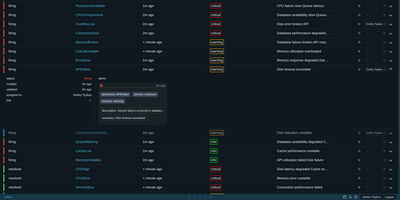
Incident response moves into the chat tool your team already lives in, with every alert landing as a Slack, Mattermost, or Telegram thread that carries a Take It button and a running escalation clock. IMPulse gives each incident a lifecycle that prevents duplicates and reduces noise. Responders take an incident, assign it, or freeze it until tomorrow, next Monday, or later, from the thread or from the web table. Escalation chains, nested as deeply as needed, wait and then notify the next person, and schedules can be edited in the UI or read from Google Calendar. Inhibition rules suppress child incidents when a parent is active, and maintenance windows mute matching alerts during planned work. The web table offers multi-column sorting, Alertmanager-style filters with regex, custom colors, an archive of closed incidents, and a light or dark theme. Sign-in goes through your chat platform, so nobody needs a separate account. Jinja2 templates reshape incident messages, thread replies, and Jira tasks, and webhooks reach Twilio, Zvonok, Instatus, and other outside services. Several instances can run together for high availability, and a REST API with Swagger documentation exposes incidents to scripts. Running on a dedicated VPS on RepoCloud with guaranteed CPU, RAM, and SSD, full root SSH access, and a browser serial console. GPL-3.0 licensed.
LangBot
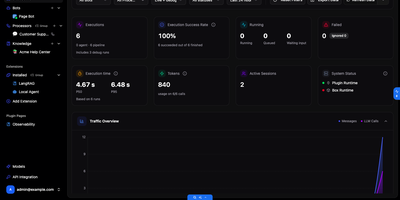
Connect one AI assistant to every chat app your customers already use, then manage it from a single admin panel. Create a bot for Slack, Discord, Telegram, LINE, Lark, DingTalk, WeCom, Matrix, KOOK, or QQ, or embed the Page Bot widget on a website with one script tag. Event routing sends each message to the processor you choose, and a pipeline controls triggers, safety rules, the model and prompt, and how replies are sent. A built-in Debug Chat streams answers as you edit, in private or group sessions. Knowledge bases split uploaded documents into chunks and search them by vector, full-text, or hybrid matching, with query rewriting and reranking options. Add providers like OpenAI, Anthropic, DeepSeek, Gemini, and Ollama, then give each pipeline its own models. The dashboard counts executions, success rate, token usage, and active sessions, and tabs list model calls, user feedback, and error logs. Sessions show the full conversation for each user, with a button to reset context. Install plugins and MCP servers from the extension marketplace to add tools. Use it for a support bot, a community assistant, an internal helpdesk, or a multi-channel front desk. Running on a dedicated VPS on RepoCloud with guaranteed CPU, RAM, and SSD, full root SSH access, and a browser serial console. Apache-2.0 licensed.
Pizza Bot
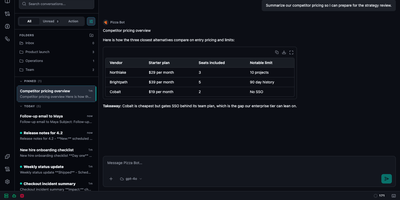
Start an AI task, close the tab, and come back to finished work waiting in an inbox. Pizza Bot keeps agents running when you navigate away or disconnect, sorting results into Unread for completed work and Action for approvals that need your decision. Conversations can be grouped into folders, pinned, searched, and forwarded from any message, without hiding matching items from the global queues. Schedules run a prompt on a cron expression with a time zone, and webhooks start a run from an external alert. A shared pool of Markdown memories carries your preferences into every conversation. Skills package step-by-step playbooks with scoped tools, and plugins bundle skills with MCP servers, so a request can be handed to a specialist subagent whose progress shows in an Activity panel. Connect Amazon Bedrock, Anthropic, Google Gemini, OpenAI, OpenRouter, Requesty, Opper, or Ollama, or point OpenAI at any compatible endpoint. Local folders are visible to the agent only after you grant them, read-only by default. Open it in the browser from one container behind a bearer token, or use the desktop app or terminal client against the same server. Running on a dedicated VPS on RepoCloud with guaranteed CPU, RAM, and SSD, full root SSH access, and a browser serial console. Apache-2.0 licensed.
OpeniLink Hub
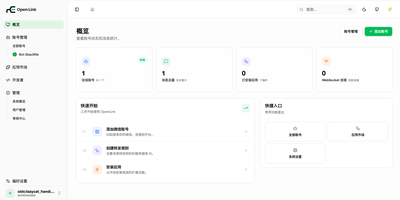
OpeniLink Hub turns a personal WeChat account into a programmable bot platform, with a web console, multi-bot management, and a one-click app marketplace that wires WeChat to Lark, Slack, GitHub, Notion, and twenty other services. Bind accounts by scanning a QR code, then watch every bot's status, expiry window, and message flow from one dashboard. Install marketplace apps without writing code: Lark gains 34 AI-callable tools across calendars, docs, tasks, and meetings, while GitHub brings 36 tools for issues, pull requests, and Actions. Every incoming message fans out in parallel over WebSocket for millisecond pushes, Webhook callbacks to your own servers, and an AI channel that answers through any OpenAI-compatible API. Message tracing follows each message from receipt to delivery, showing exactly which hop stalled when something breaks. Passkey sign-in with fingerprint or hardware keys keeps the console protected, with GitHub and LinuxDo OAuth as alternatives. Reminders, expense tracking, currency conversion, RSS digests, and cron-scheduled pushes run as installable apps, and expiry reminders warn you before the 24-hour reply window closes. Build your own integrations with official SDKs for Go, Node.js, Python, PHP, Java, C#, and Lua, or expose local CLI commands as chat-callable tools with the Runner app. Running on a dedicated VPS on RepoCloud with guaranteed CPU, RAM, and SSD, full root SSH access, and a browser serial console. MIT licensed.
PandaWiki
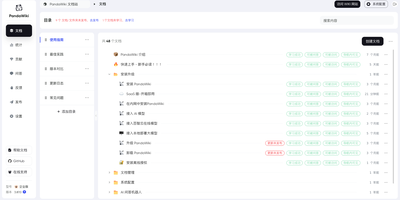
In seven wizard steps, PandaWiki sets up a product docs, manual, FAQ, or blog site whose built-in AI answers visitors using only your own content. Those visitors can chat with an assistant that cites its sources and accepts image questions, or switch to a docs-only search that lists ranked pages with summaries. Publishing stays under control: each document has three switches, visible in navigation, reachable by URL, and answerable by AI, and nothing appears or gets learned until it is published. Authors write in a Markdown and HTML editor, or import from URLs, RSS and Atom feeds, sitemaps, offline .txt, .md, .xlsx, .docx, and .pdf files, Notion, Yuque, SiYuan, Wiki.js, Feishu, Confluence, and DingTalk. Pages export to Word, PDF, or Markdown. The wizard covers models, domain, HTTP or HTTPS ports, import, publishing, answer testing, and page decoration. One knowledge base can also feed a web widget and DingTalk, Feishu, WeCom, and Discord bots. Administrators get a dashboard of visits, questions, visitor regions, hot documents, and referring domains. Chat models come from Baizhi Cloud, DeepSeek, OpenAI, or Ollama, while vector and reranking models are built in. The open-source edition covers one wiki site, 300 documents, and one admin, and its console and documentation are in Chinese. Running on a dedicated VPS on RepoCloud with guaranteed CPU, RAM, and SSD, full root SSH access, and a browser serial console. AGPL-3.0 licensed.
Mumble
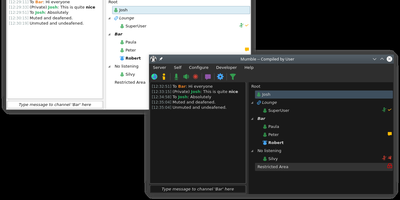
Voice chat for a gaming community, a podcast crew, or a distributed team stops depending on someone else's platform once you run your own Mumble server. The Murmur server hosts channels where hundreds of users can talk at once with latency low enough for competitive play, and every conversation is encrypted in transit with certificate-based authentication for identities. Administrators shape access with a detailed permission system: channels can be public, password-gated, or arranged so two groups stay separate while their leaders can speak to both. Users get positional audio in supported games, an in-game overlay showing who is talking, a multi-channel recorder for podcast production, and a public server browser for finding communities. The server side is built for automation: the Ice middleware interface exposes user and channel management to scripts, authenticator modules check logins against existing account databases, and community web interfaces and channel viewers plug into the same API. Running the server is light on resources, and regulars can register their identity once and be recognized across visits without passwords. Running on a dedicated VPS on RepoCloud with guaranteed CPU, RAM, and SSD, full root SSH access, and a browser serial console. BSD-3-Clause licensed.
Casibase
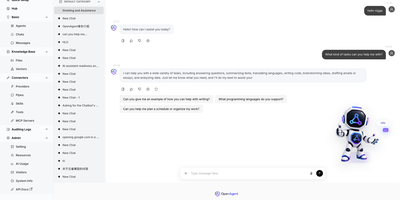
Casibase lets organizations build AI-powered knowledge bases that answer questions from their own documents, connecting to 30+ model providers through a unified admin interface with RAG retrieval and multi-agent orchestration via MCP and A2A protocols. The platform plugs into OpenAI GPT-4o, Anthropic Claude, Meta Llama, Google Gemini, DeepSeek, Ollama local models, HuggingFace, Azure OpenAI, and additional providers, while embedding APIs from OpenAI Ada and Baidu handle vector representation of ingested documents. Document ingestion parses TXT, Markdown, DOCX, PDF, CSV, XLSX, and PPTX files with intelligent chunking strategies for optimal retrieval accuracy. The built-in chat interface provides real-time AI conversations with manual session handover for human agent escalation, and comprehensive chat session logging enables audit trails for compliance. Enterprise identity management integrates Casdoor for Single Sign-On supporting GitHub, Google, WeChat, and OIDC providers with fine-grained access control via the Casbin permission engine. The multi-tenant architecture supports isolated knowledge bases per organization with role-based user management and configurable storage, model, and embedding providers per tenant. The React frontend with Ant Design v5 provides a polished admin dashboard for managing providers, knowledge stores, chat sessions, and user access, while the Go backend with Beego framework handles API logic with MySQL or MariaDB persistence. Running on a dedicated VPS on RepoCloud with guaranteed CPU, RAM, and SSD, full root SSH access, and a browser serial console. Apache 2.0 licensed.
Synapse
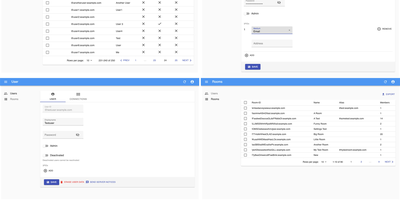
Your chat server should be able to talk to everyone else's chat server: Synapse is the reference homeserver for the Matrix network, hosting your users, rooms, and message history on infrastructure you control while federating openly with thousands of other servers. People keep their own identity on your domain and still message friends, colleagues, and communities elsewhere, because rooms are shared across servers instead of locked inside one company's silo. Any Matrix client works against it, from Element on phones and desktops to a shelf of community clients, and end-to-end encrypted conversations stay readable only by their participants. Bridges and application services wire the network into Slack, Discord, Telegram, IRC, and other systems, so existing conversations can move across gradually instead of in one painful migration weekend. Single sign-on through SAML or OpenID Connect folds chat accounts into the identity provider your organization already runs, and guests, registration controls, and rate limits stay in your hands. Media uploads, message history, and user data live in your PostgreSQL database and your file storage, with retention and federation policies set per room or for the whole server. When one process is no longer enough, worker processes split the load, Prometheus metrics show where it goes, and the admin API handles accounts, rooms, and moderation programmatically. Running on a dedicated VPS on RepoCloud with guaranteed CPU, RAM, and SSD, full root SSH access, and a browser serial console. AGPL-3.0 licensed.
Openfire
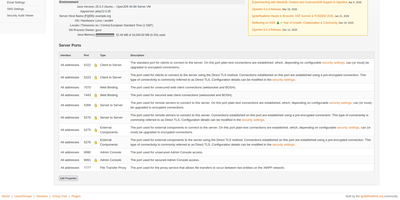
Openfire is a self-hosted XMPP server that gives your organization its own instant messaging network, with one-to-one chat, persistent group rooms, and federation to other XMPP servers, all administered from a web console. Team members connect with any XMPP client on desktop, mobile, or the web and get presence, rosters, offline message delivery, and file sharing inside conversations. Multi-user chat rooms stay available around the clock with configurable history, moderation roles, and access controls, so a support channel or project room keeps its context instead of dissolving into scattered direct messages. The plugin catalog installs from inside the admin console and adds capabilities like message archiving and compliance monitoring, a browser-based chat client, HTTP file upload, and push notifications for mobile clients. An LDAP directory or an existing database can supply users and groups, so accounts stay in sync with the directory your organization already maintains. Server-to-server federation connects your users with contacts on other XMPP domains over encrypted connections, and load balancing spreads busy deployments across multiple instances. TLS certificates, encrypted client ports, and IP-based access lists for the admin console keep the deployment under your control from the first setup wizard onward. Running on a dedicated VPS on RepoCloud with guaranteed CPU, RAM, and SSD, full root SSH access, and a browser serial console. Apache-2.0 licensed.
Matterbridge
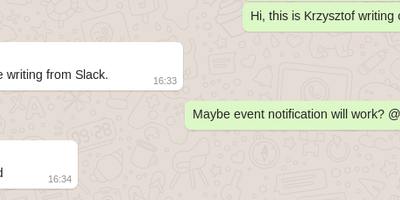
With over 7,500 GitHub stars and 140 contributors, Matterbridge is the Go-powered chat bridge that connects over 20 messaging platforms through a single TOML configuration file, letting teams communicate across platform boundaries without forcing anyone to switch applications. The gateway architecture routes messages bidirectionally between any combination of Discord, Slack, Telegram, Matrix, IRC, Mattermost, Microsoft Teams, XMPP, Rocket.Chat, Nextcloud Talk, Keybase, Mumble, Twitch, WhatsApp, VK, Gitter, Zulip, ssh-chat, and Harmony, with transparent username and avatar spoofing so bridged messages appear native on each platform. Message edits and deletes propagate across bridges, file attachments and inline images transfer between protocols, threading and reply context is preserved where platforms support it, and private group bridging enables confidential cross-platform conversations. Multiple independent gateways can run simultaneously, each bridging different channel sets with different protocol combinations. The REST API enables third-party integrations and custom bridges without modifying the Matterbridge codebase, while the tengo scripting engine allows inline message transformation and filtering. Game chat support bridges Minecraft and Counter-Strike server chat into messaging platforms. Deployment runs as a single static Go binary with zero dependencies, or as the official Docker image with the configuration file mounted as a volume. Running on a dedicated VPS on RepoCloud with guaranteed CPU, RAM, and SSD, full root SSH access, and a browser serial console. Apache-2.0 licensed.
Insights LM
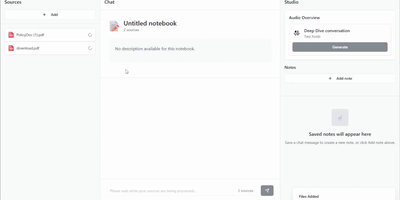
Insights LM gives you a NotebookLM-style research assistant that runs on your own infrastructure and answers strictly from the documents you feed it. Build a notebook for a project, drop in PDFs, pasted text, website links, and audio files, then ask questions in plain language and get answers grounded in those sources rather than the open internet. Every answer carries citations you can click to jump straight to the passage it came from, so verifying a claim takes seconds instead of a fresh search. Findings worth keeping become notes saved alongside the notebook, building a private knowledge base that grows with your research. When reading is too slow, generate an audio overview and listen to two hosts discuss your material like a podcast episode, perfect for absorbing a long report on a walk. Teams use it to interrogate internal documentation, onboard new hires against company knowledge, and brief themselves before meetings without uploading confidential files to a third-party service. Because the whole stack is yours, you choose which AI models do the reading, including local models for fully private work. Running on a dedicated VPS on RepoCloud with guaranteed CPU, RAM, and SSD, full root SSH access, and a browser serial console. MIT licensed.